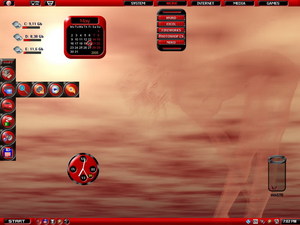
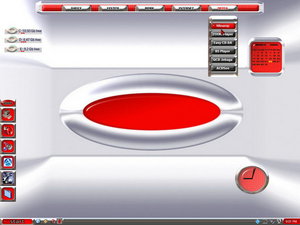
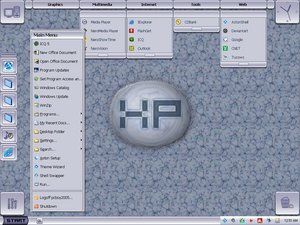
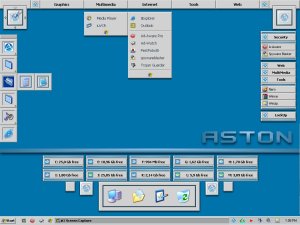
Description: It`s black and orange theme for 1280x1024 and 1024x768 screen res I`ve been recieving e-mails from people that don`t know how to unpack plain zip files so this time It`s in the form of sfx just double click it and browse your aston theme folder. Special thanks to unknown author of included wallpaper My respect
Description: This is the updated version What`s new: Now supports 1280x1024 and 1024x768 res Added recyclebinex plugin skin-hope you like it Fixed problem with right toolbar Added matching rainlandar skin etc If you liked the beta 1 version you`ll like this one even more
Description: IT`s a smooth, clean and really neat aston theme that supports 1024x786,1280x960,800x600 screen resolutions I`m really proud of It, It includes matching altdesk skin and a rainlender skin(normal only) I think It`s worth trying
After a format & reinstallation of Aston (after a nasty trojan decided to take refuge in my pc) I have been able to finish SilverXP. It's heavily based on XP's silver theme but with an Aston twist.
I didn't skin the vert panel this time mainly due to enjoying an uncluttered desktop for a change.
You will need to load the Aclock, RecyclebinEX & Panel plugins.
As for the wallpaper, yeah I know, it's pretty basic but I like it.
I have included in the Icon folder an empty panel incase anyone wants to add other icons into SilverXP and keep the flow of the theme. The icons were started in Grayscale on a transparent background, A drop shadow was applied then smoothed. They were then tweeked with a bit of Saturation to invoke the purpleish look. Once finished they then were dropped on top of the blank panel.
I hope you enjoy SilverXP as much as I have making it.
Welcome to my new theme. I enjoyed the challenge of trying to imitate the look of classic Windows. The graphics are quite simple but I found them very soothing on the eyes. When first fired up you will need to load these pluggins. Aclock, Vertpanel, DisksEx, & Panel. That is assuming you don’t already have these loaded.
Placement of the Disks is personal choice. I did have them on the left hand side which looked good but the left sidebar going over the top didn’t look all that good.
I hope you enjoy Classic Aston05
Feel free to contact me at pc_boy_2005[_AT_]yahoo.co.nz
Description: Like his predecessor Fabulous K II is a Glossy style and cool look. Now it is a full version. Here is the System Monitor, sneek new Panel (which you've been seen in the preview), newly Taskbar, left and right ToolBars (but I don't use them), an Recycled and my old Analog Clock :) Wait for your opinions and suggestions. Phoenix.
=[Release History]=-
[version 0.8] First look to Fabulous K II - the successor of my Fabulous K In this release was included: Panel skin, System Monitor, Analog Clock, black-skinned old Taskbar
[version 1.0] Final Release! Fixed some bugs, added new Tasbar and menu, AMD processor in System Monitor, Left and Right TaskBars and Recycled skin.
=[Thanksgiving:]= MobyDock Original Apple Icons Konfabulator americanpsycho for his Wallpaper "Into the Great Wide Open"
=[Plug-ins used:]= Panel for Aston ver 1.0 Quick Launch Panel 1.8.2c Quick Task Terminator 2.2c CPU, Memory and Net usage monitor ver. 1.1 Taskbar ClockEx 1.8.2c Aston Clock ver 1.1 with anti-aliasing Main menu with skins & icons 1.9.1c RecycleBinEx for Aston 1.0
=[Guide on “how to use” for «Fabulous K II»]=
First of all I want to note that in screenshot is not only my Aston. Is composed from many objects which I describe in the ThanksGiving, so if I miss something or someone note me and I will fix that .
1. First you need to download the theme (is RAR archive so be sure you can unpack it [7-ZiP is a free tool that can do this [Link]). 2. When you've downloaded the package unpack it to your Aston's Themes folder. 3. Before you use the theme you need to decide - use My Panel items or use Yours (anyway you don't lose your config). So, if You want to use my items you need to append the contents of listed in package "copy_me.txt" to "Plugins.rc" file (Note! - if you've installed Aston in other folder than "D:\Aston\" [my installation] replace all occurences of this with your Aston's root path). It's the easiest way. Now if you want to leave your items load theme from "Theme Wizard" and then "Aston Settings" go to plugins and select "Panel". Right-ckick to it and select "plugin settings" in the "Panel Items" box write "Items" [by default, elsewhere your items name]. Press "ok". A Panel with your icons must be appear. Right-click on it and select "change". Now replace all the folders (upper items) names with dots "." then select icons from distribution [only 5 by me: multimedia, system, works, internet and games]. If you need an icon that is not listed here in package is the template (PSD), mac icons U can dowload from [Link]
Good Luck!
P.S. Please post some comments! Favs are very appreciated!
P.P.S. I’ve added a Photoshop template for Panel Icons (if you want to extend it)
Note! If you want to have that systme customization which you've seen in menu install Flyakite OSX XP transformation pack from here [Link]
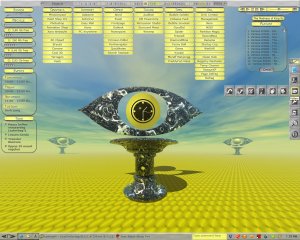
Description: After creating my first wallpaper, I decided to build a first Aston theme around it. And here it is: Eye On Spring. Created while using res 1280x1024, but optimized for 1024x768 and 1152x846 as well. Matching Rainlendar skin included. Please take a look at the readme and howto for tips on installation. Enjoy! :)


 Prev
Prev Next
Next


 Rate/Comment